
I converted a FashionMNIST CNN to INT8 with ONNX Runtime and ran it on the CPU. The model file became about 72% smaller, but inference took longer at all three batch sizes tested. Accuracy fell from 86.50% to 86.37%.
The small accuracy change also hid a larger change in individual predictions: 78 of the 10,000 test images received a different label. File size, accuracy and speed were three separate results here.
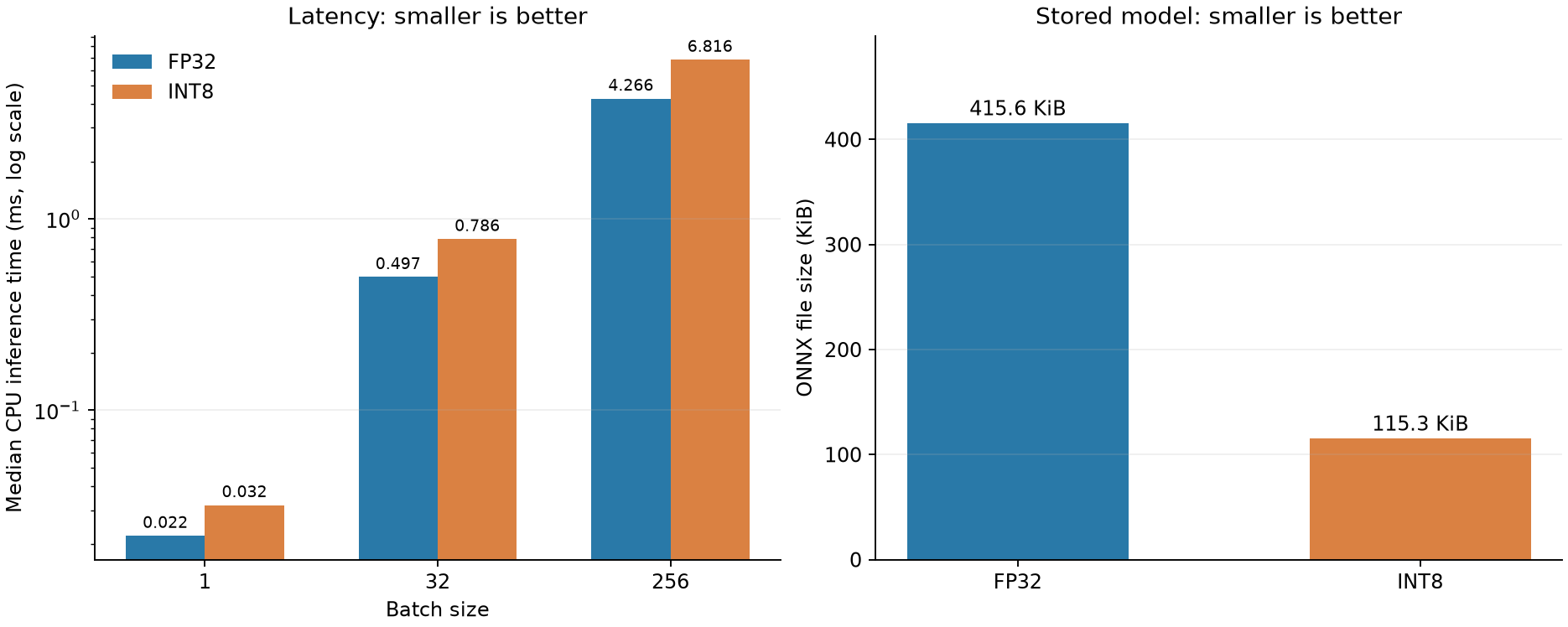
Smaller files did not mean faster inference
| Measurement | FP32 | INT8 |
|---|---|---|
| ONNX file size | 425,562 bytes (415.6 KiB) | 118,105 bytes (115.3 KiB) |
| Accuracy on 10,000 test images | 86.50% | 86.37% |
| Predictions changed from FP32 | — | 78 |
| Batch 1: median inference time | 0.0220 ms | 0.0319 ms |
| Batch 32: median inference time | 0.4974 ms | 0.7861 ms |
| Batch 256: median inference time | 4.2658 ms | 6.8155 ms |
INT8 took about 1.45–1.60 times as long. These are inference calls on inputs already in memory; model loading, image-file reading, preprocessing and display are outside the timer.
Of the 78 changed predictions, 40 went from correct to incorrect, 27 went the other way, and 11 changed between two incorrect labels. The net loss of 13 correct answers does not describe all the differences between the models.
Environment and files
The CPU was a Core i7-14700F, running Windows 11 with WSL 2 and Ubuntu 26.04 LTS. The software was Python 3.14.4, PyTorch 2.13.0+cu130, torchvision 0.28.0+cu130, ONNX 1.22.0, ONNX Runtime 1.29.0 and NumPy 2.5.2. Although CUDA-enabled PyTorch was installed, inference used only CPUExecutionProvider. A GPU is not required.
You need a working Python environment with PyTorch and torchvision. FashionMNIST adds about 31 MB of compressed downloads; allow roughly 100 MB for data and outputs, separate from the Python environment. The experiment itself took tens of seconds on this PC, excluding downloads. An existing Python environment needs neither administrator access nor a restart for these commands.
The reproduction repository includes the original FP32 ONNX model, not just a script expecting a private file. Its SHA-256 is 1147ce7c98c4e2e4bfb1eadaaf04cb4b899590d1693a6cbede63a32447be2074. FashionMNIST is downloaded by torchvision on the first run.
Run the comparison
Use an environment in which import torch, torchvision already works. If needed, follow the PyTorch installation selector for your OS and Python version. The directory below, ~/ai-experiments, is an example workspace.
git clone https://github.com/matrizea/yuyuyuroom-ai-experiments.git ~/ai-experiments
cd ~/ai-experiments
python -m pip install onnx==1.22.0 onnxruntime==1.29.0 numpy==2.5.2 matplotlib
python ai_lab/experiment_onnx_int8_static.py --preprocess
python ai_lab/plot_onnx_int8_static.py
python -m unittest discover -s ai_lab -p test_onnx_int8_static.py -v
If Git is unavailable, GitHub’s Code → Download ZIP also works. Keep the repository layout intact, including ai_lab/models/fashion_cnn_dynamic.onnx.
The recorded run reported "fp32": 0.865, "int8": 0.8637 and "changed_predictions": 78 under its accuracy results. The test suite finished with Ran 5 tests ... OK. Timing will vary across PCs.
The unrounded results are saved to ai_lab/results/onnx_int8_static/preprocessed/result.json. The accompanying timings_raw.csv contains 3,000 inference calls. The plotting script writes figures/onnx-int8-static-cpu-comparison.png.
Calibration chooses the integer scale
Quantization maps floating-point values to a smaller set of integer values. A scale controls the spacing between those values. Weight values are already stored in the model, but the range of intermediate activations depends on the input. That is why this experiment first passed calibration images through the network.
Calibration used 512 images selected from the training set with seed 42. None of the 10,000 test images were used to choose the scales. The configuration was static quantization, MinMax calibration, signed INT8 weights and activations, per-output-channel weight scales, and QDQ format.
The essential calls are:
quant_pre_process(
    input_model=fp32_path,
    output_model_path=preprocessed_path,
)
quantize_static(
    model_input=preprocessed_path,
    model_output=int8_path,
    calibration_data_reader=train_image_reader,
    quant_format=QuantFormat.QDQ,
    activation_type=QuantType.QInt8,
    weight_type=QuantType.QInt8,
    per_channel=True,
    calibrate_method=CalibrationMethod.MinMax,
    op_types_to_quantize=["Conv", "Gemm", "MatMul"],
)
QDQ inserts QuantizeLinear and DequantizeLinear nodes. Their presence alone does not establish that every operation runs as integer arithmetic. I also saved the graph after CPU optimization: the FP32 graph had two Conv and two Gemm nodes, while the optimized INT8 graph had two QLinearConv and two QGemm nodes. Both models loaded and ran on the CPU provider.
ONNX Runtime warned that the optimized graph could contain CPU-specific transformations. Keep *_optimized.onnx as an inspection artifact. The ordinary quantized model to move between environments is ai_lab/models/fashion_cnn_preprocessed_static_int8_qdq.onnx, subject to testing on the destination runtime. See the ONNX Runtime quantization guide for the distinction between preparation, quantization and optimization.
How the timing was controlled
Both models used the same input, CPUExecutionProvider, intra_op_num_threads=1 and ORT_ENABLE_ALL. At each batch size—1, 32 and 256—the script ran 20 warm-up calls followed by five rounds of 100 measured calls. It alternated the order of the conditions. Each table entry is the median of 500 calls.
Integer operators were present, yet the complete inference call was slower. Quantization and dequantization, kernel implementations and CPU instructions can all matter for a small network. This run did not profile individual operators, so it does not identify which cost dominated. It measures this CNN on one CPU thread, not the performance of INT8 on every CPU or accelerator.
An initial run without quantization preprocessing produced a preparation warning. Adding preprocessing and repeating the comparison left accuracy and the number of changed predictions unchanged. INT8 remained slower at all three batch sizes. The table uses the preprocessed run.
If the script stops before producing results
No module named 'torch': checkpython -c 'import sys; print(sys.executable)', thenpython -c 'import torch, torchvision'. Install dependencies into that same environment. Windows Python and WSL Python are separate installations.- Missing ONNX file: check that
ai_lab/models/fashion_cnn_dynamic.onnxexists. Download the whole repository rather than an isolated script. - Dataset download fails: restore network access and rerun. Do not substitute test images for the calibration set.
- An integer operator is unsupported: check the ONNX Runtime version and execution provider. This result used version 1.29.0 with the CPU provider; loading a model and checking its optimized graph are separate steps.
For this one-thread CPU workload, quantization saved storage rather than time. The accuracy reduction was small in aggregate, but the changed predictions still matter if particular clothing classes are important to the application.
Browse English articles · Earlier weight-rounding experiment (Japanese)